Fiber Optic Cable Types and How to Choose Them
Section titled “Fiber Optic Cable Types and How to Choose Them”A fiber optic cable carries data as light. Common applications include server connections, storage networks, links between buildings, and telecommunications networks.
Choosing a cable means matching the fiber type, optical interface, connector, and fiber count. An LC plug that fits a port does not establish compatibility, and single-mode fiber alone does not guarantee a particular reach.
Standards and product documentation in this article were checked on October 28, 2026. The distances below describe specific interfaces; use the specifications of your actual equipment and optics for deployment.
What the cable does
Section titled “What the cable does”An optical fiber has a light-guiding core, surrounding cladding, and protective coatings. Glass fiber is the usual medium in the network applications discussed here.
An optical transceiver converts electrical signals into light and converts received light back into electrical signals. SFP, SFP+, QSFP+, and QSFP28 describe module families and interfaces, rather than fiber categories.
Ethernet and Fibre Channel are communications technologies; fiber is the transmission medium. A cable described as an “FC cable” in a storage network may be an ordinary compatible fiber assembly. Identical connectors do not make Ethernet and Fibre Channel devices interoperable.
Multimode versus single-mode fiber
Section titled “Multimode versus single-mode fiber”A mode is a pattern in which light propagates through a fiber. Multimode fiber supports multiple modes. Their different arrival times spread an optical pulse, an effect called modal dispersion that limits reach at higher data rates.
| Property | Multimode fiber (MMF) | Single-mode fiber (SMF) |
|---|---|---|
| Common categories | OM1–OM5 | OS1, OS2, and related categories |
| Typical dimensional markings | 50/125µm or 62.5/125µm | Commonly sold as 9/125µm |
| Applications | Short data center links, servers, and storage | Campus backbones, telecom links, and data center connections |
| Example interfaces | 10GBASE-SR, 40GBASE-SR4 | 10GBASE-LR, 100GBASE-LR4 |
The marking 50/125µm gives the core and cladding diameters. For single-mode fiber, the familiar 9/125µm label is a useful product description; optical specifications also use wavelength-dependent mode field diameter.
Changing to single-mode fiber does not automatically increase the link speed. Both 10GBASE-SR and 10GBASE-LR operate at 10Gbps. Fiber and optics determine which reaches and interfaces are possible.
Also, “single-mode” does not mean one fiber, and “multimode” does not mean multiple fibers. Mode and fiber count are separate properties.
Multimode categories: OM1 through OM5
Section titled “Multimode categories: OM1 through OM5”OM stands for Optical Multimode. Its number is a category designation, rather than a data rate.
| Category | Typical core diameter | What to know |
|---|---|---|
| OM1 | 62.5µm | Usually encountered in older installations |
| OM2 | 50µm | Legacy cabling with limited reach at higher speeds |
| OM3 | 50µm | Laser-optimized fiber for high-speed links |
| OM4 | 50µm | Higher modal bandwidth than OM3, extending reach for supported interfaces |
| OM5 | 50µm | Wideband multimode fiber designed for shortwave WDM applications |
OM5 specifies bandwidth at 953nm as well as 850nm. Its benefit depends on the optics: replacing OM4 with OM5 does not necessarily extend a conventional 850nm SR link. See Cisco’s OM4 and OM5 comparison.
Are OM categories backward compatible?
Section titled “Are OM categories backward compatible?”OM4 supports applications designed for OM3, and OM5 supports applications designed for OM4 and OM3. Connectors, polish, fiber count, and transceiver requirements must still match. See CommScope’s multimode fiber overview.
| Replacement or mixed path | What it means |
|---|---|
| Replace an entire OM3 path with OM4 | Existing OM3 applications can continue; speed does not automatically increase |
| Replace an entire OM4 path with OM5 | Existing OM4 applications can continue; any reach improvement depends on the optics |
| Add an OM4 patch cord to an OM3 trunk | Possible, but the complete path does not become OM4 |
| Add OM3 or OM4 patch cords to an OM1 trunk | Avoid mixing typical 62.5µm OM1 with 50µm fiber because the core mismatch introduces high loss |
OM2 through OM5 share a typical 50µm core but differ in bandwidth. Design mixed paths conservatively around the lower category and verify segment lengths, bandwidth, and loss. Prefer a consistent category throughout. See Fluke Networks’ guidance on mixing fiber types.
Reach depends on the optical interface
Section titled “Reach depends on the optical interface”| Fiber | 10GBASE-SR | 40GBASE-SR4 | 100GBASE-SR4 |
|---|---|---|---|
| OM1 | 33m | Outside this table’s scope | Outside this table’s scope |
| OM2 | 82m | Outside this table’s scope | Outside this table’s scope |
| OM3 | 300m | 100m | 70m |
| OM4 | 400m | 150m | 100m |
| OM5 | 400m | 150m | 100m |
Sources: Cisco 10GBASE SFP+, Cisco 40GBASE QSFP, and TIA FOTC 100GBASE-SR4. The OM1 and OM2 figures assume 200MHz·km and 500MHz·km bandwidth at 850nm respectively. Core diameter alone is insufficient to qualify older fiber.
These figures apply to the complete channel, including patch cords, subject to its loss limits. Identify the full interface name, such as SR4: a distance quoted for 100GBASE-SR10 cannot simply be reused for 100GBASE-SR4.
Single-mode categories: OS1 and OS2
Section titled “Single-mode categories: OS1 and OS2”OS stands for Optical Singlemode. OS1 and OS2 differ in loss characteristics and related requirements; OS2 is generally used for lower-loss cabling.
Avoid treating these as indoor-only and outdoor-only labels. OS2 is also available for indoor and indoor/outdoor installation. Environmental suitability depends on the jacket, water protection, and installation method. For an example, see Legrand’s indoor/outdoor OS2 cable specifications.
| Interface | Data rate | Representative reach on SMF | Active fibers |
|---|---|---|---|
| 1000BASE-LX | 1Gbps | 5km | 2 |
| 10GBASE-LR | 10Gbps | 10km | 2 |
| 40GBASE-LR4 | 40Gbps | 10km | 2 |
| 100GBASE-LR4 | 100Gbps | 10km | 2 |
Source: TIA FOTC’s single-mode Ethernet reference. Some 1Gbps products support 10km, but distinguish product-specific reach from the standard 5km 1000BASE-LX range.
OS2 does not provide unlimited reach. Fiber attenuation, connector loss, and splice loss must fit within the optical link’s loss budget. The transceiver specification sets the relevant limits.
Are OS categories backward compatible?
Section titled “Are OS categories backward compatible?”OS2 can generally serve applications previously using OS1. Some OS2 products explicitly meet OS1 requirements too, as documented in Legrand’s OS2 cable specification.
These are cable performance categories, rather than protocol generations. Verify the optic’s required fiber specification, such as ITU-T G.652, along with wavelength, connectors, polish, and total channel loss.
Adding an OS2 patch cord does not improve an OS1 trunk’s attenuation or turn the channel into OS2. The reverse substitution is not guaranteed either: OS1 may fail the loss requirements of a link designed for OS2.
MMF and SMF are not backward-compatible alternatives to each other. Moving from OM to OS requires reviewing the optics as well as the cable.
LC, SC, and MPO connectors
Section titled “LC, SC, and MPO connectors”| Connector | Characteristics | Common applications |
|---|---|---|
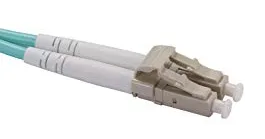
| LC | Small, latched connector; often paired in a duplex assembly | SFP-family optics, servers, switches, and patch panels |
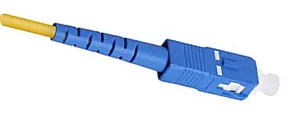
| SC | Larger push-pull connector | ONUs, media converters, and patch panels |
| MPO | Multiple fibers in one connector | Parallel optics and high-density trunks |
LC is used with both MMF and SMF. SC remains common in access and patching infrastructure. MTP is a trademarked connector product family compatible with MPO.
What the connectors look like
Section titled “What the connectors look like”| LC: duplex example | SC: simplex example | MPO: multifiber example |
|---|---|---|
 |
 |
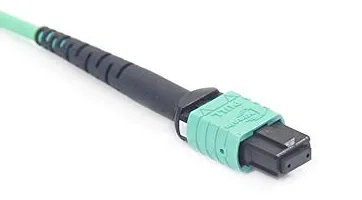 |
Jacket and housing colors vary between products.
For MPO, check fiber count, guide pins, key orientation, and polarity. In a common 12-fiber MPO implementation of 40GBASE-SR4 or 100GBASE-SR4, four fibers transmit and four receive; the middle four positions are unused. The assembly’s total fiber count can therefore exceed the interface’s active fiber count.
40GbE and 100GbE do not always require MPO. LR4 interfaces, for example, use wavelength multiplexing and duplex LC connections.
Polish and color markings
Section titled “Polish and color markings”Connector shape is only part of the specification. UPC and angled APC end faces are different and must not be directly mated. Match the polish required by the optic and patching system.
Typical jacket colors include aqua for OM3, aqua or violet for OM4, lime green for OM5, and yellow for OS2. Check the printed markings and part number as well; color alone is insufficient. See AMD’s optical cable guide.
One fiber, two fibers, and bidirectional links
Section titled “One fiber, two fibers, and bidirectional links”For patch cords, “simplex” usually describes a one-fiber assembly and “duplex” a two-fiber assembly. These construction terms should be distinguished from simplex and full-duplex communications.
| Arrangement | How it carries traffic | What to verify |
|---|---|---|
| Conventional two-fiber link | One transmit fiber and one receive fiber | End-to-end Tx/Rx polarity |
| Single-fiber BiDi | Different wavelengths carry both directions on one fiber | A complementary pair of optics |
| Parallel optics | Multiple fibers carry separate lanes | Fiber count, lane mapping, and polarity |
BiDi means bidirectional. Wavelength-division multiplexing (WDM) allows simultaneous transmission and reception over one fiber. There is no general 1Gbps limit on single-fiber links; 50Gbps single-fiber BiDi optics are one example. Check the required U/D pair or other complementary part numbers instead of assuming that two identical modules will work.
Tx/Rx polarity on a duplex link
Section titled “Tx/Rx polarity on a duplex link”Tx means transmit and Rx means receive. A conventional two-fiber connection needs the following mapping:
Device A Device BTx ───────── Fiber 1 ────────→ RxRx ←──────── Fiber 2 ───────── TxConnecting Tx to Tx and Rx to Rx prevents the receivers from seeing the intended signals. Polarity describes this mapping.
With patch panels and intermediate connections, verify the complete path from each transmitter to the opposite receiver. The presence of a patch panel alone does not determine whether the mapping is correct.
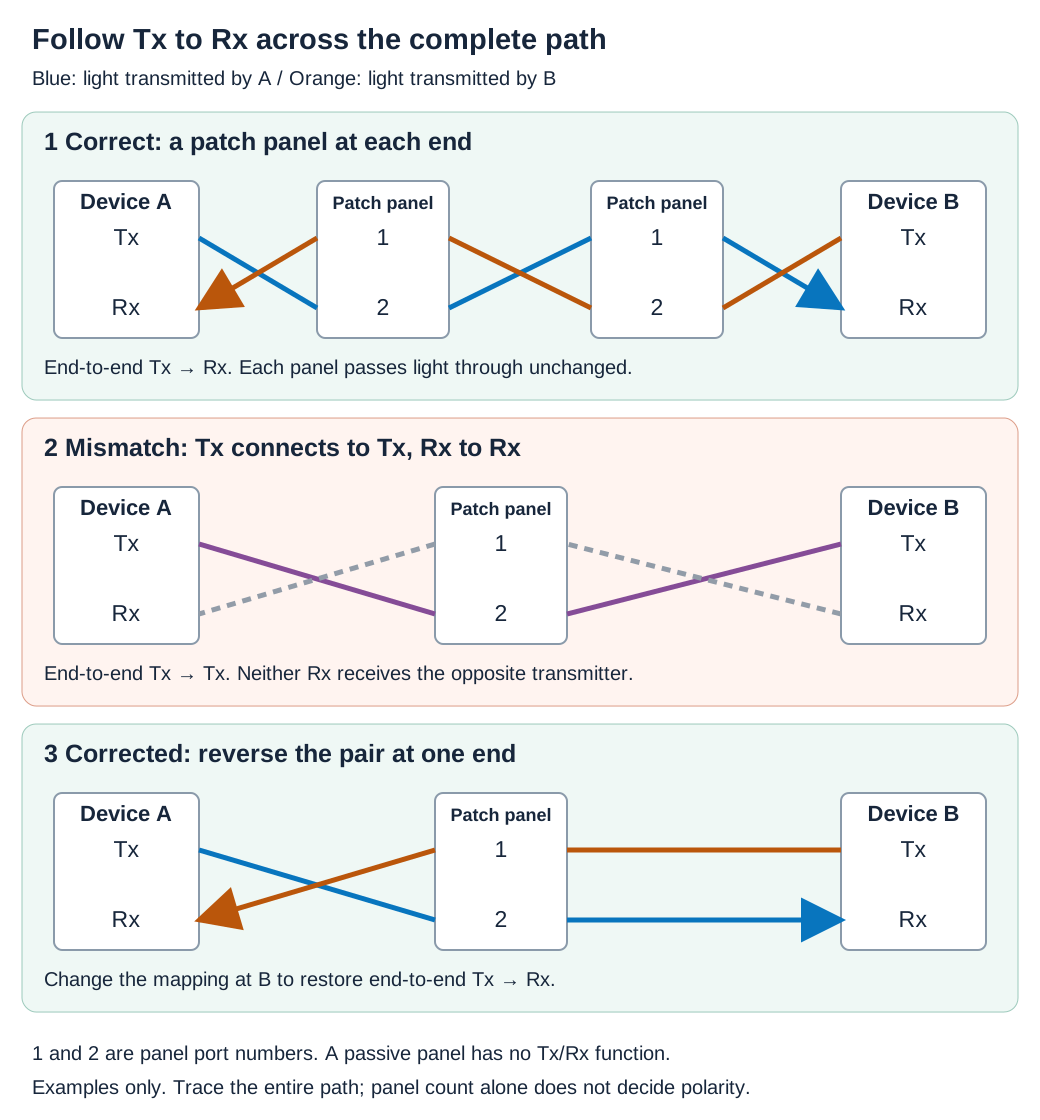
Panels are passive connection points, so their ports are numbered 1 and 2 rather than labeled Tx and Rx. Crossing lines represent fiber mapping, rather than an optical split or junction.
If a duplex polarity mismatch is confirmed, follow the connector manufacturer’s procedure to reverse the pair at one end. MPO systems also have lane assignments and require a planned polarity scheme; treat them as a complete cabling system.
A cross-connect cabling example
Section titled “A cross-connect cabling example”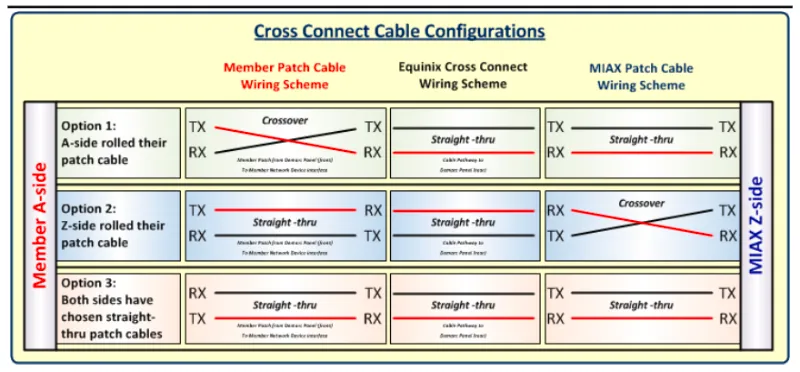
The diagram assumes a straight-through central cross-connect and illustrates how the end connections complete the path. It is not a universal description of a provider’s current service: check the handoff specification and port assignments for the actual circuit.
Breakout connections
Section titled “Breakout connections”A breakout connection can turn one supported high-speed port into several lower-speed links.
| Supported parent port | Example child links |
|---|---|
| 40G QSFP+ | Four 10G SFP+ links |
| 100G QSFP28 | Four 25G SFP28 links |
Optical implementations can use compatible parallel optics and an MPO-to-LC fan-out assembly. Integrated active optical cable (AOC) and copper direct-attach cable (DAC) breakouts are other options.
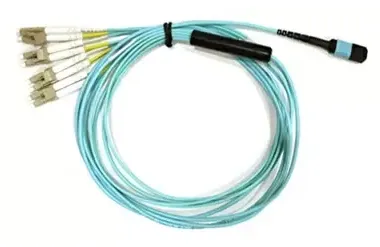
The MPO-to-LC fan-out assembly groups eight fibers at the MPO end and separates them into four two-fiber LC pairs. With compatible parallel optics, each pair carries one transmit and receive link.
A branching cable does not make every port breakout-capable. Verify the switch, software, optics, and port-splitting configuration. A wavelength-multiplexed LR4 link cannot be turned into four independent links simply by adding a passive LC splitter.
A practical selection workflow
Section titled “A practical selection workflow”- Establish speed and total channel length. Include patch cords and intermediate connections.
- Choose an interface supported at both ends. Check optics compatibility as well as the module form factor.
- Identify the entire fiber path. Confirm MMF or SMF, the OM/OS category, and any existing trunk cabling.
- Match connectors, polish, fiber count, and polarity. For BiDi, check wavelengths; for MPO, check pins and lane mapping.
- Verify optical loss and installation requirements. Include connector and splice loss, bend radius, and the cable’s environmental rating.
For a 50m 10GbE link, compatible SR optics and duplex LC OM3 or OM4 cabling are candidates. For a 2km 10GbE link, LR optics and suitable SMF are candidates, subject to loss limits. At the same 50m distance, a 100GBASE-SR4 link requires a parallel optical path.
If the link stays down
Section titled “If the link stays down”Start with port enablement, speed, and transceiver support, then work through the physical path:
- Confirm fiber type, matching optical interfaces, and any BiDi wavelength pair.
- Check duplex polarity or MPO lane mapping.
- Inspect connector end faces with suitable equipment; clean if necessary and inspect again.
- Look for tight bends, crushed cables, or partially seated connectors.
- Where DOM/DDM is available, compare transmit and receive power with the module’s limits. Excessive received power can cause problems as well as insufficient power.
Optical power in range does not guarantee a working link: speed and FEC settings may also need attention. See Cisco Meraki’s SFP troubleshooting guide.
Never look directly into a fiber end or optical port. Use appropriate instruments to check for light, including wavelengths invisible to the eye.
References
Section titled “References”- CommScope: Multimode fiber — Fact File
- Fluke Networks: Considerations for Mixing Multimode Fiber Types
- Legrand: Indoor/outdoor OS2 cable specification, also meeting OS1 requirements
- Original Japanese article: Optical fiber cable types
- Cisco: 10GBASE SFP+ Modules Data Sheet
- Cisco: 40GBASE QSFP Modules Data Sheet
- Cisco: 100GBASE QSFP-100G Modules Data Sheet
- TIA FOTC: 100GBASE-SR4 Application Overview
- TIA FOTC: Single-mode Optical Fiber Ethernet Standards
- Cisco: Understanding the Differences Between OM4 and OM5 Multimode Fiber
- AMD: Optical Cables (XAPP1404)
- Eaton: Fiber Optic Cable Buying Guide
- Cisco: Cleaning Optical Connectors